SaaS providers should use email to drive Engagement, Conversion, and Retention, but to achieve those goals, some rules should be followed.
UPDATED FOR 2015!
Regardless of the type of email – Transactional or Marketing – your email has to:
The implementation of the tactics required to reach those goals vary from absolutely required (in the first two) to suggestions of what seems to work but you’ll want to test (the last three). I encourage you to know your customer and focus on them before creating any type of email marketing campaigns, follow-up sequences, etc.
Get Delivered
One day I was working with a SaaS vendor with a super-low free-trial-to-paid conversion rate. As I was going through their metrics, I saw that over 50% of the people that signed-up for their Free Trial never clicked the link in the activation email.
After some investigation, it turned out that they had a delivery problem that was causing the email delivery to fail… they worked hard to get people to sign-up for their Free Trial and INSTANTLY turned away at least 50% of their prospects because they didn’t get the activation email!
Don’t be like that… get your emails delivered using these tips
- Sending through your own SMTP servers is a bad idea
- Use a credible delivery service (see “How to keep App-generated Email from Being Marked Spam“)
- Use whatever you can (and that makes sense) to authenticate your domain
- DomainKey Identified Mail (DKIM)
- Sender Policy Framework (SPF)
- Return Path Certification // this is a commercial (not free) offering and only if you qualify
- A few years ago, 37 Signals published a post on how they handle outbound transactional email themselves and get a 99.3% delivery rate… and their post shows you exactly why you should avoid doing this yourself (it takes a lot of effort!) at least at first.
- Honestly, there is a lot of stuff going on behind the scenes with the email infrastructure – and it’s always changing – and my opinion is that you don’t need to focus on that right now… or probably ever.
Generally, improving the chances of delivery is accomplished by using some combination of SPF and DKIM (as mentioned above) to basically show the email infrastructure gods that the system you’re sending from is an authorized agent for the domain you’re representing vs. some random machine out there sending “on behalf of.”
This is accomplished at the DNS level in conjunction with some settings with the provider you’re using. Before you choose a solution, make sure they offer this level of authentication. Also ensure that you have the ability to do this on your end (you have to make changes to your DNS settings).
Most modern outbound prospecting systems do since they’re usually built on top of Mandrill, Mailjet, or Sendgrid. And any modern systems built in the last few years – even from scratch – are going to support that.
You can also use Yesware or Hubspot Sidekick inside of GMail or Outlook and just leverage your existing email setup. This works really well, but in GMail you have to be cognizant of send limits…
While there are behind-the-scenes reasons for signing and authenticating your emails, there is also something that’s receiver-facing that could erode trust if not taken care of.
If you’ve ever seen “sent on behalf of” or “sent via” in the from part of an email – especially in GMail – it was caused by an unsigned/authenticated email. This is most often the case when third-party systems send email for you. These include Email Marketing systems to CRMs to reminder services.
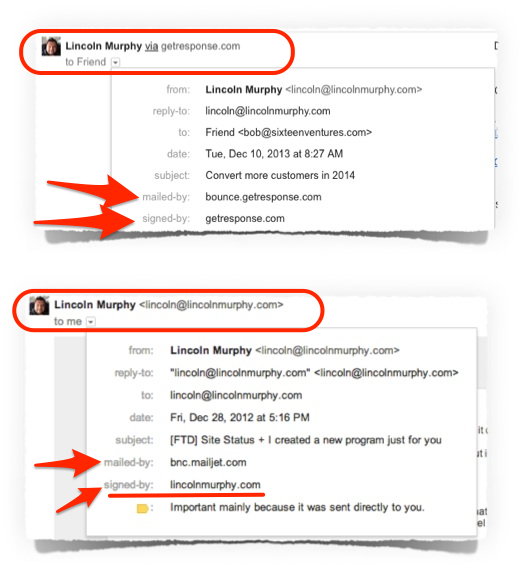
And this is a problem because it looks like the email comes from a third-party system… it’s obvious that your “personal email” was sent through an email marketing system and therefore is automated. Not a good way to start a trusting relationship, right?
Get to the Inbox
Google is continuing to make changes to GMail and their changes – as they should be – are for the users of GMail (and the advertisers that pay them to get access to the inbox UI).
Some of these changes – from the addition of the Tabbed Inbox to the image caching/proxy announcement of late 2013 – have the potential to massively disrupt email marketers and the way we’ve done business for years.
Of course, how substantially you’ll be affected by these – and future GMail changes – depends on the amount of your audience that uses GMail.
One thing we can assume, however, is if GMail does something and it seems like a good idea, then other Email providers – web-based or otherwise – may start to include those, too.
That said, there are still things we can – and should – to increase engagement with your audience regardless of what changes GMail has mad:
- Ask the potential customer immediately after giving you their email address to:
- whitelist you
- add your contact info to their address book
- check the spam filter / folder for the email message
- Manage Expectations that they’ll be getting this – and other – emails from you
- Provide a visual for them
- Whether they do any of that or not you’re guiding them to a better experience


Asana is awesome because they have a todo list (which is what they are) that indicates you should check your email (though they still need to say who its from and to check your spam filter…)

- Folks in the Internet Marketing business know that getting the email opened and validated is the most important thing right then so do whatever you can to make that happen.
- You should look at it the same way.
- Send both HTML & text versions as email systems that identify a piece of bulk mail but fail to see both versions will often see that as SPAM.
- Make sure you’re CAN-SPAM compliant – address, unsubscribes
Get Opened
- Open Rate is a vanity metric… don’t be so concerned about this (unless it is going down!)
- Who the email is from is very important
- Manage expectations after they sign-up “you’ll get an email from…”
- Humanize the from Joe @ XYZ App or Joe Smith (the former allows for instant recognition, be careful w/ length)
- noreply@ or donotreply@ = missed opportunity and shows you don’t want to hear from them
- Allow people to respond to your emails and engage
- Here’s a great post that also talks about the problem of email “from:” fields and SaaS / Web Apps….

- The email subject is super important
- It is the Headline of your email
- Headlines have one job – get people to read your ad or your article
- The Email Subject has one job – get people to open your email
- Some people recommend spending as much time writing the subject as you do the email itself
- The subject line is what get’s people to open the email
- If the subject isn’t compelling, they won’t open it
- One place where Open Rate can be used is in testing the subject lines
- Some systems make it easy to A/B test subjects; sometimes you’ll have to manually test
- See which subject line – even in transactional emails – results in the most opens.
- Where possible, try to correlate that with Clicks (see below in the “Positive Action” section) because a subject line that results in opens (overall, a vanity metric) could be misleading and therefore result in a lower CTR, meaning the email ultimately failed to do what it was supposed to do.
- It should be CAN-SPAM compliant
- Even more… it should be common-sense compliant
- Make it something you’d open (or not you… but your customer)
- Don’t waste space by including your name in the subject
- Prefix in the subject is acceptable, but keep it short (like [FTD])

- But test longer subjects… they might work well for your market.
- Use the pre-header as a sort of subheadline to get people to open the email
- Don’t forget that the plain-text pre-header can be used to provide that subheadline goodness where the HTML version might have the “view on the web” stuff put in by your template.


Get Read
- Write emails your audience would like to – and can (on their preferred device) – read
- Know your audience
- Speak their language
- Use the right tone
- Speak to the person reading the email…. you might send 100k emails, but each one goes to 1 person… use direct language
- Don’t say “hi everybody” just say “hi”… massive difference
- Don’t make it all about you… your product, service, features, etc. Make it about them, about their problems (and how you’ll solve it), about their opportunities, etc.
- Remember, it is email MARKETING and marketing should be all about the customer.
- Create for their consuming device (see my Mailchimp stats below where ~56% of my audience reads the emails I send on an iPhone)

- HTML layouts are fine, but it is the content & Call to Action (CTA) that is most important.
- A pretty design w/ bad copy & no or too many CTAs is bad
Get ‘Em to Take Action
- CTR – Click Through Rate (Clicks in Mailchimp or Aweber) is what you’re after here
- Sometimes the click will lead to a marketing / sales page, sometimes (many times) it will lead back into the app (there are ways to do this in mobile apps, too)
- Always send them back into the app if possible
- For example – even if for pre-sales indoctrination – don’t send them to a PDF directly or attach it to the email. Instead, take the content and put it in an area of the site or app and allow them to download the PDF from there, surrounded by additional CTAs. Those CTAs should be to drive them to the next step; use the app, sign-up for the trial, attend a webinar, etc.


- All roads lead back to the app and they all end up at conversion!
- That means sometimes you can just ask for the sale (while reminding the reader why they should convert) or you can make them an offer to sign-up right now.

- Always write with a singular purpose – if you currently have emails with 7 different things in them, that could be fodder for 7 different emails… and each individual one is likely to be more effective on its own


- Don’t waste people’s time
- Have a single reason for writing
- Confused minds don’t [???]… whatever it is you want them to do if there are too many options
- Include a phone number in a conspicuous place
- Which also means Reduce Negative Actions (like unsubscribes)
- Always deliver value so they won’t want to unsubscribe
- Remind them that unsubscribing means they’ll miss out… put some copy above the opt-out link that reminds them that opting-out is permanent and that you really value their membership and to contact you if they have ideas on how to improve the messages they receive
- If they want to opt-out, send them to a page that explains why they shouldn’t opt-out for marketing, encourage them to change preferences to a different email address rather than fully opt-out
- Ideally, provide granular settings so they can reduce the number of messages they get
- which is why even transactional messages to include a CTA (yes, even a pitch)

What SaaS Email Marketing / Engagement tools to use?
For transactional email, there is a list of resources in this post called “How to keep App-generated Email from Being Marked Spam“
For email marketing, Free Trial follow-up, etc. you can use a variety of techniques.
Option 1 might be to roll your own follow-up process where you tag events in your app to send email via API through one of the vendors listed here.
Option 2 might use a more traditional Email Marketing service with an auto-responder (not triggered or behavior-based, but better than nothing!).
Option 3 could be to use one of the relatively new SaaS providers designed specifically for “lifecycle” email marketing.
Here are some potential vendors to checkout for Options 1 and 2:
Traditional SaaS Email Marketing / Newsletter / Auto-responder Vendors
There are tons of email marketing providers, but those are the six that I have direct experience with, though I recommend you do your homework when selecting any vendor.
SaaS Lifecycle Marketing Vendors
These are more focused on in-app messaging and heavier on the back-end analytics
There are tons of other “marketing automation” tools out there like Hubspot or Pardot… but that’s beyond the scope of this narrowly focused post. And many of those tools don’t do what some of these I’ve listed do.
Well, there you have it… no guarantees that all of that will help you, but I bet it will. I know for most SaaS providers, the time it took to read this was more time than they spent on their entire email marketing & follow-up strategy!
 About Lincoln Murphy